How to connect Apple Health
How to connect apple help to your CoreCoach account
Written By Jacob Elliott
Last updated 6 months ago
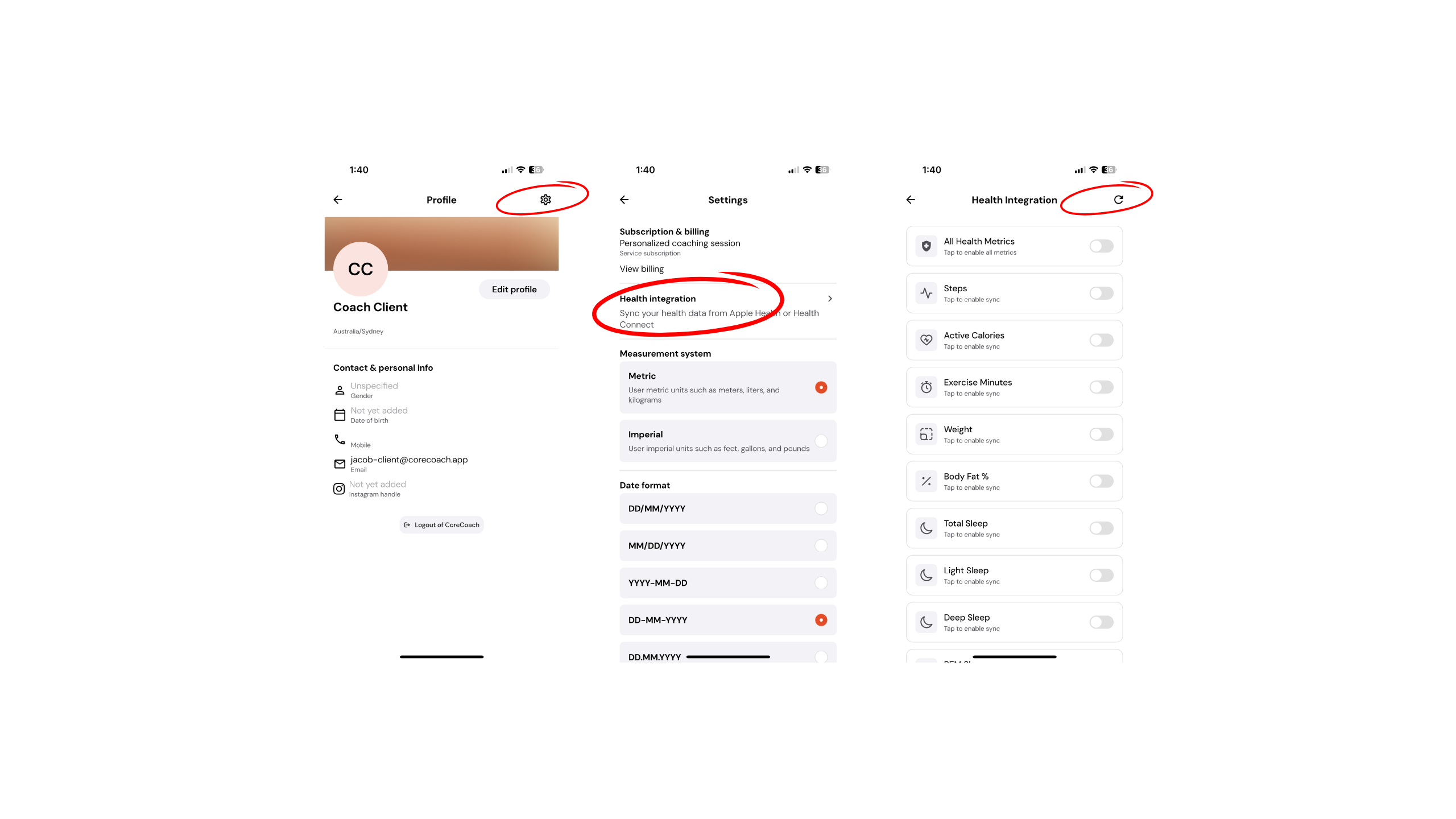
Step 1: Go to Your Profile
Open the CoreCoach app and navigate to your Profile.
Step 2: Open Settings
Inside your profile, select Settings.
Step 3: Select Health Integration
Scroll until you see Health Integration, then tap into it.
Step 4: Enable Metrics
Toggle on Enable All Metrics.
You will then be prompted to follow the Apple Health permission steps. Make sure you allow access to the metrics you would like CoreCoach to track.
Step 5: Refresh (If Needed)
Once connected, if your data does not immediately appear, tap the small refresh button in the top right-hand corner. This will update and sync your data.
Once connected, your Apple Health data can automatically carry over into the habits your coach has assigned you, helping keep everything accurate and up to date.
If you run into any issues, please reach out to our support team and we’ll be happy to help.